Have you ever counted the terminals in a café? An order kiosk, a counter POS, a card reader, paper tickets going to the kitchen, and a stock ledger. Plenty of terminals, and they do not speak to each other. So a person joins them up. Staff read the kiosk order and shout it to the kitchen, payment happens on yet another machine, and stock is reconciled by hand at night.
Adding one more terminal cannot be the answer. The payment terminal already in the shop simply does not know how to share a screen.
This article is a record of standing one server up beside that terminal, attaching a tablet, a PC and a kitchen screen — and getting each attached device to become a kiosk, a POS and a kitchen display. No app was built for any of the three devices. And the card authorisation path was not touched by a single line. Every screen below is a capture of pixels really rendered from a real run.
The result first — three screens
A customer orders on the tablet.
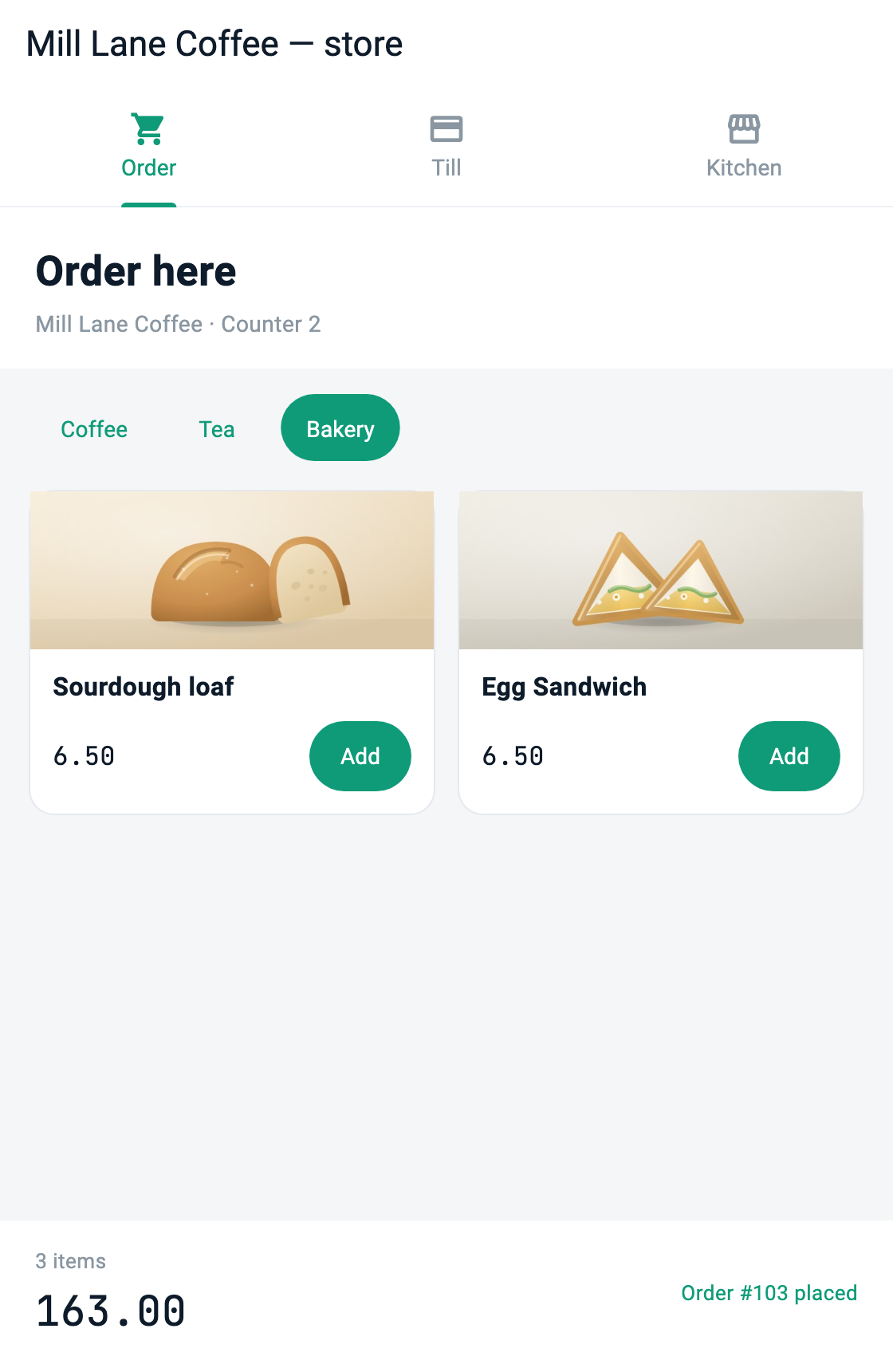
At the same moment, those orders are up on the kitchen screen.
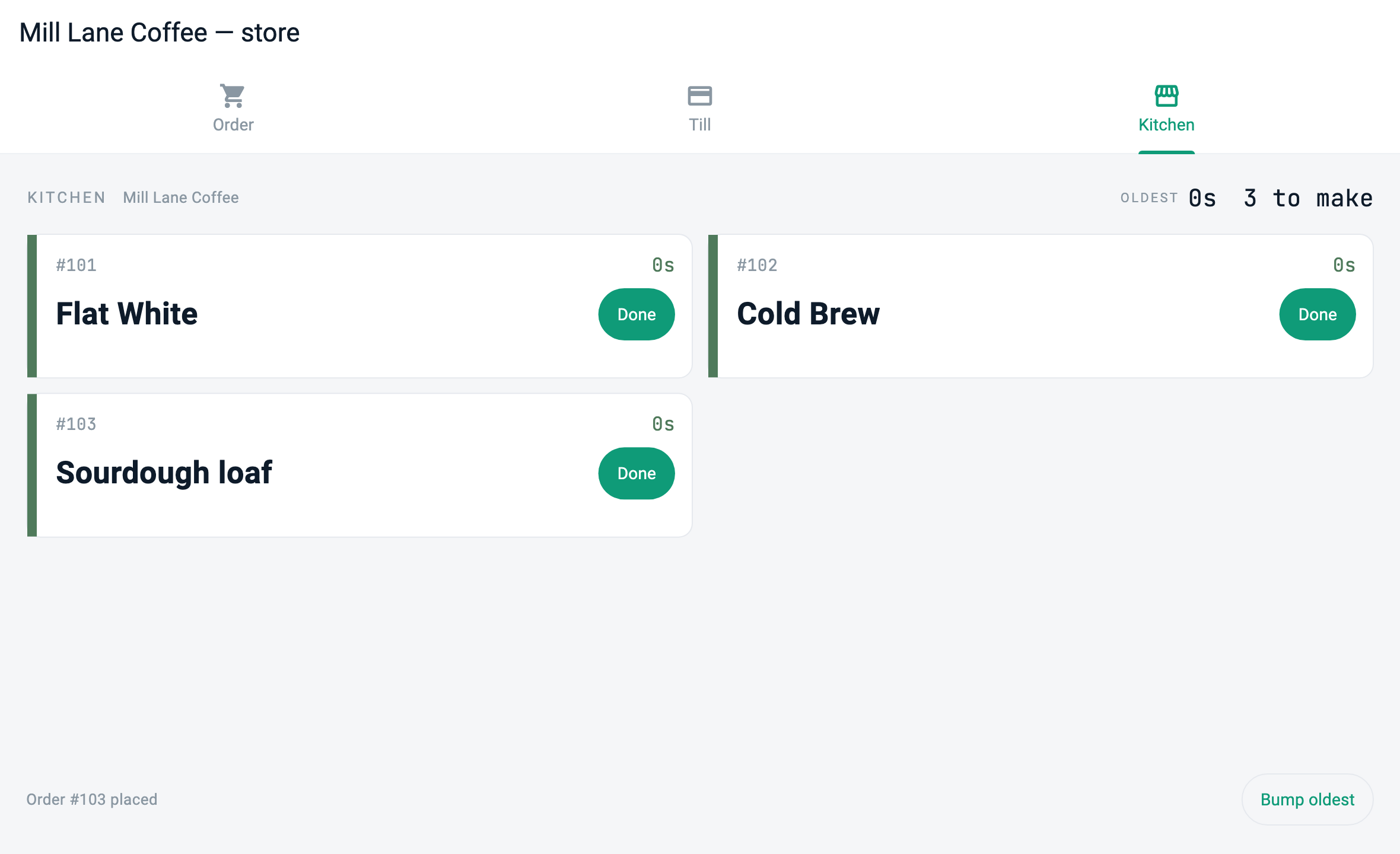
Charge at the counter and the terminal returns an authorisation.
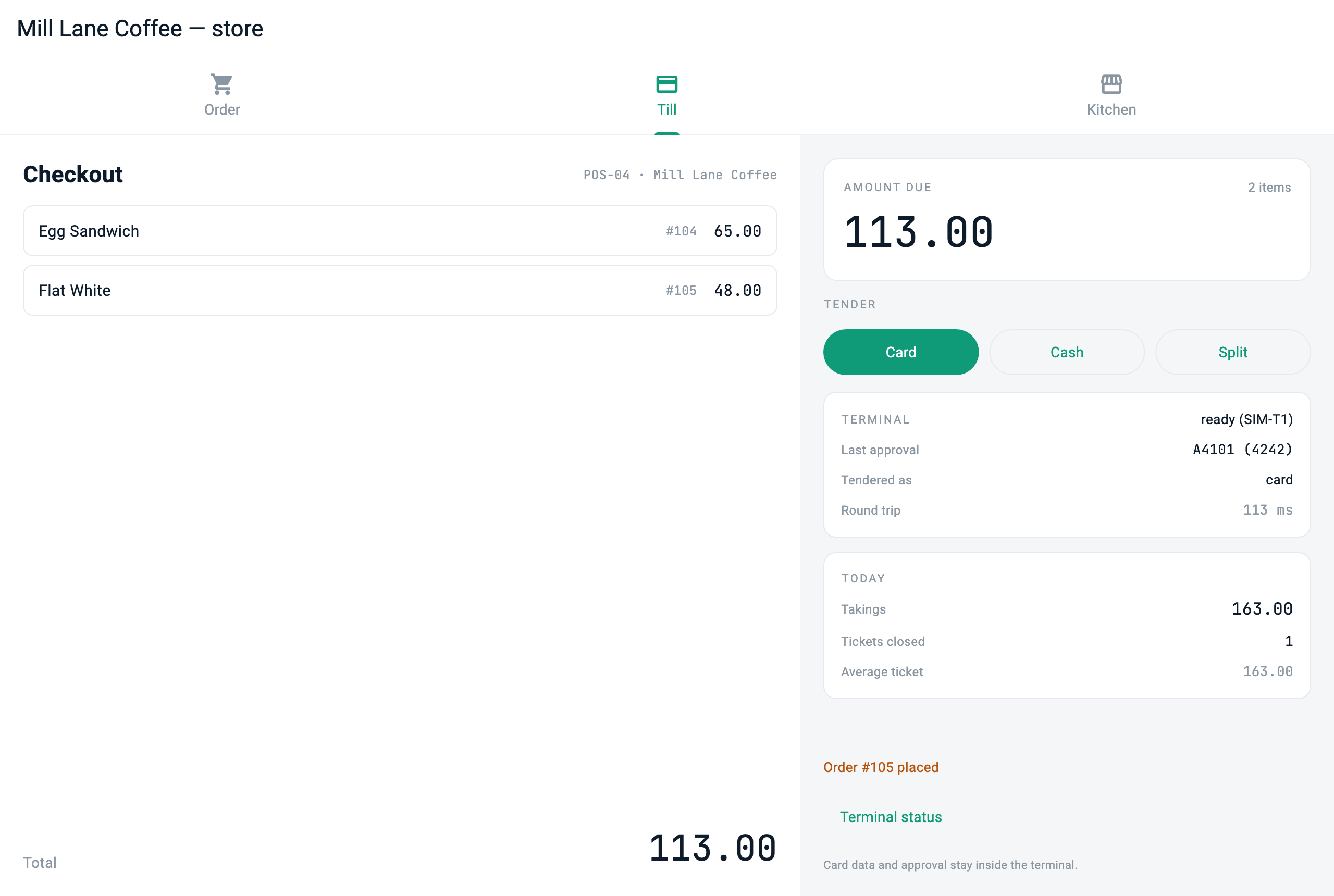
The three screens are three different definitions served by the same server. There is no separate tablet app, POS app and kitchen app.
The whole picture
terminal_sim (C)                store_server (Dart · mcp_server)         clients ×3
  terminal endpoint  ──serial/usb──▶  owns order and sales state    ──MCP──▶  tablet   /kiosk
  answers only with an approval       serves one app, three screens  ──MCP──▶  PC       /pos
                                      relays requests via the adapter ──MCP──▶ kitchen  /kds

                                      ui://app        the app — routes, theme, navigation
                                      ui://app/info   what a launcher reads first
ui://pages/* the screens the routes resolve to| Piece | What it does | Who writes it |
|---|---|---|
| Shop server app | Holds order, prep and sales state, and serves the screen definition matching the role that connected | The developer |
| Terminal adapter | Passes an authorisation request to the terminal and takes the answer back. That is all | The developer |
| Clients ×3 | Render the definition the server gave | A few lines of role selection |
| Terminal endpoint | Returns approvals | (simulated in this sample — see below) |
Here, the inside of the payment terminal is not our code. Card data, the approval decision and the VAN link all stay inside the terminal's certified secure area. What we do is ask "please approve this amount" and take an answer. That asymmetry is the whole of this article.
① Where one server serves three screens
This is the centre of the article. The server publishes one app for the shop, and a station comes in at one of its routes.
const Map<String, dynamic> applicationDefinition = {
  'type': 'application',
  'id': 'coffee.milllane.store',
  'title': 'Mill Lane Coffee — store',
  'theme': _storeTheme,            // where the three screens declare colour once
  'initialRoute': '/kiosk',
  'routes': {
    '/kiosk': 'ui://pages/kiosk',
    '/pos': 'ui://pages/pos',
    '/kds': 'ui://pages/kds',
  },
  'navigation': {
    'type': 'tabs',
    'items': [
      {'title': 'Order', 'icon': 'shopping_cart', 'route': '/kiosk'},
      {'title': 'Till', 'icon': 'payment', 'route': '/pos'},
      {'title': 'Kitchen', 'icon': 'storefront', 'route': '/kds'},
    ],
  },
  // Once, when the app opens: the menu carries the photographs and changes
  // about as often as the price list.
  'onInit': {'type': 'tool', 'tool': 'menu.list', 'params': {}},
};

final screens = <String, (String, String, Map<String, dynamic>)>{
  'ui://pages/kiosk': ('Self Order Kiosk', 'Customer-facing order screen', kioskDefinition),
  'ui://pages/pos': ('Counter POS', 'Owner-facing sales and payment screen', posDefinition),
  'ui://pages/kds': ('Kitchen Display', 'Kitchen order queue', kdsDefinition),
};

screens.forEach((uri, spec) {
  final (name, description, definition) = spec;
  server.addResource(
    uri: uri,
    name: name,
    description: description,
    mimeType: 'application/json',
    handler: (requestedUri, params) async => ReadResourceResult(
      contents: [
        ResourceContentInfo(
          uri: requestedUri,
          mimeType: 'application/json',
          text: jsonEncode(definition),
        ),
      ],
    ),
  );
});
The substance of "the device becomes the terminal" is this route table. Want another screen — a waiting-number display in the window — that is one line in routes and one in screens. You do not build an app to install on that device.
Keeping the three screens as routes of one app rather than three loose documents has a reason. None of them declares a theme, and all three come out the same colour, because the app declared it once and the routes inherit it. As separate documents that colour would be written three times, and what is written three times eventually disagrees.
The client side is this short. The role is not a screen name but the door it comes in at.
const _role = String.fromEnvironment('ROLE', defaultValue: 'kiosk');

// Take the shop's app. Do not ask for a document made for this device.
final resource = await client.readResource('ui://app');
final definition = jsonDecode(resource.contents.first.text!) as Map<String, dynamic>;

final runtime = MCPUIRuntime();
await runtime.initialize(
  definition,
  launchRoute: '/$_role',                  // where this device stands
  onToolCall: onTool,                      // a tap on the screen becomes a tool call
  pageLoader: (route) async {              // the page a route names, from the same server
    final uri = (definition['routes'] as Map?)?[route] as String? ?? route;
    final page = await client.readResource(uri);
    return jsonDecode(page.contents.first.text!) as Map<String, dynamic>;
  },
);
On the kitchen display it runs with --dart-define=ROLE=kds, on the counter PC with ROLE=pos. The same binary. Nowhere in this file is there code describing what the kitchen screen looks like — the server knows that.
Passing onToolCall to initialize is not incidental either. An application-level onInit fires inside initialize, so on a host that hands the executor over only at render time that first call reaches nothing — and a screen that never received the menu opens quietly empty.
② The terminal adapter — the code most likely to be copied out of this article
Send an authorisation request and wait for the answer. That really is all it does, and that thinness is the argument.
/// Send one request and wait for the answer bearing the same id.
///
/// Matched by id rather than by arrival order, because a link is a stream,
/// not a call stack. A status query slipping in while an authorisation is
/// still in flight must not steal the authorisation's answer.
Future<Map<String, dynamic>> call(
  String tool, [
  Map<String, dynamic> args = const {},
]) async {
  final id = _nextId++;
  final completer = Completer<Map<String, dynamic>>();
  _pending[id] = completer;

  final request = jsonEncode({'id': id, 'tool': tool, 'args': args});
  transcript.add('=> $request');
  _proc.stdin.writeln(request);

  final reply = await completer.future.timeout(
    requestTimeout,
    onTimeout: () {
      _pending.remove(id);
      throw TimeoutException('terminal did not answer $tool', requestTimeout);
    },
  );
  if (reply['ok'] != true) {
    throw StateError('terminal refused $tool: ${reply['error']}');
  }
  return (reply['result'] as Map).cast<String, dynamic>();
}
Let me write down why the timeout is three seconds. That is arithmetic, not taste.
/// How long to wait for the terminal.
///
/// The simulator answers in 70–160 ms. A real authorisation is dominated by
/// the VAN round trip, so the order of magnitude is the same. Three seconds
/// is set deliberately far above that distribution. A timeout here must mean
/// "the terminal is gone," not "it was slower than usual." Tighten it to a
/// few hundred milliseconds and a perfectly good authorisation turns into a
/// failure — and a payment reported as failed that actually went through is
/// the worst outcome this adapter can produce.
final Duration requestTimeout;
And the payment handler. What this code does not do matters more.
handler: (args) async {
  final unpaid = _orders.where((o) => o['paid'] == false).toList();
  if (unpaid.isEmpty) { _notice = 'Nothing to charge'; return _state(); }
  final amount = unpaid.fold<int>(0, (sum, o) => sum + (o['price'] as int));

  final started = DateTime.now();
  try {
    final result = await terminal.call('terminal.authorize', {'amount': amount});
    final elapsed = DateTime.now().difference(started);
    for (final o in unpaid) { o['paid'] = true; }
    _salesTotal += amount;
    _lastApproval = '${result['approvalCode']} (${result['last4']})';
    _lastRoundTripMs = elapsed.inMilliseconds;
  } on TimeoutException {
    // A timeout is not a decline. We do not know what the terminal did,
    // so we say we do not know. We do not decide it failed on our own.
    _notice = 'Terminal did not answer — check the receipt before retrying';
  }
  return _state();
}
It does not read the card. It does not judge whether the customer may pay. It does not connect to the VAN. It counts the amount, asks, and records the answer. Everything that happens between the asking and the answer happens inside certified hardware this sample never opens.
Please note the timeout handling. The most dangerous state in payments is not a decline but not knowing. If the authorisation actually went through and we treat it as a failure, the customer is out of pocket with no order. So when we do not know, we write on the screen that we do not know.
This content requires Developer or above
Sign in and upgrade your plan to continue reading.
View Plans